

An all-in-one POS system is defined as an integrated platform combining payment processing, inventory management, sales reporting, and hardware into a single unified solution. For retail and hospitality SMEs, the question of why choose all-in-one POS comes down to one practical reality: fewer systems mean fewer failures, fewer logins, and far less time wasted on administrative work. Providers such as AlphaPay and FAVORPOS have documented measurable gains in operational efficiency for businesses that consolidate onto a single platform. This guide covers the operational, security, and scalability advantages, alongside honest trade-offs, so you can make a confident decision in 2026.
Why choose all-in-one POS for daily operations?
An all-in-one POS system removes the friction of managing separate tools for payments, stock, and reporting. Fewer vendor touchpoints lower risk and overhead for SMEs without dedicated IT staff. When something breaks, you call one number. There is no “vendor ping-pong” between your payment provider, your stock system, and your hardware supplier.
The hidden efficiency gain is reconciliation. Unified all-in-one setups eliminate reconciliation work comparing front-of-house sales against back-office accounting. For a busy café or convenience store, that alone can save hours each week. AlphaPay identifies this as one of the most underestimated operational wins for retail and hospitality SMEs.

The time savings compound quickly. All-in-one restaurant POS systems save over 20 hours weekly by automating back-office tasks and centralising reporting. FAVORPOS quantifies roughly nine of those hours coming from unified financial reporting alone. For a small restaurant owner managing payroll, suppliers, and service simultaneously, that is a significant return.
Staff training also improves. Standardised workflows mean new team members learn one system, not three. Onboarding speed relies heavily on standardising workflows during configuration, which integrated design makes far simpler. Fewer steps at the checkout also reduce errors and speed up service during peak hours.
- Single login for sales, returns, taxes, and reporting
- One support line for hardware and software issues
- Consistent checkout process reduces staff errors
- Automated end-of-day reporting replaces manual tallying
- Faster onboarding for new staff across all roles
Pro Tip: Before committing to any platform, ask the vendor to demonstrate the full end-of-day reporting cycle live. If it takes more than three clicks to produce a daily sales summary, the system is not as integrated as advertised.
How reliable and secure are all-in-one POS systems?
Reliability is where all-in-one systems either prove their worth or expose their weaknesses. True offline mode is the benchmark test. A genuine offline capability means terminals operate fully locally, with a local menu copy, routing orders inside the local area network, and auto-syncing with the cloud within 2–5 minutes after internet restoration.
Many systems claim offline functionality but deliver something far weaker. Cloud-dependent POS platforms can lock out terminals on internet loss, causing complete revenue loss during outages. Shift4 Dine documents a real deployment where the absence of true local authentication caused a full night of lost revenue for a restaurant. That is not a theoretical risk. It is a documented operational failure.
“Offline behaviour and payment security should be rigorously tested by business owners during demos to avoid costly failures during busy periods.” — FAVORPOS
FAVORPOS stresses that testing offline behaviour during demos is non-negotiable. Ask vendors to simulate a full internet outage during your trial. Watch whether the system processes transactions, stores orders, and syncs correctly on reconnection. Some systems claiming offline mode still corrupt inventory or cause duplicate payments under loss of connectivity.
Payment security deserves equal scrutiny. A PCI-listed P2PE solution reduces the PCI DSS requirements merchants must meet and limits exposure to card data risks. Akurateco is clear that compliance benefits apply only to validated solutions, not to generic encryption claims. Unvalidated encryption offers no scope reduction whatsoever. Always ask vendors for their PCI-listed P2PE certification number and verify it independently on the PCI Security Standards Council website.
For further guidance on POS data security compliance, Ycr has published a detailed breakdown of what UK retailers need to check before signing any POS contract.
Do all-in-one POS systems support multi-location growth?
Multi-location management is where integrated POS systems deliver their strongest long-term value. Centralised inventory management removes the need for manual data entry across multiple stores. Multi-location inventory features reduce the need for expensive ERP systems or manual workaround solutions for retailers and restaurateurs operating more than one site.
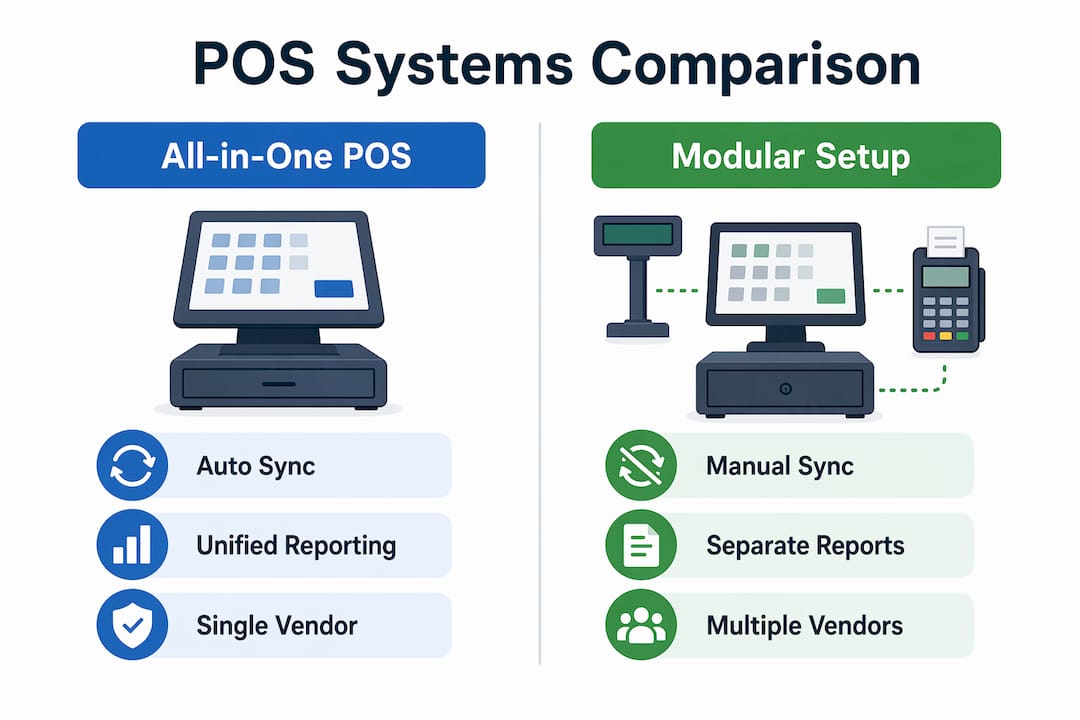
The table below compares how all-in-one POS handles multi-site operations against a typical modular setup.
| Feature | All-in-One POS | Modular Setup |
|---|---|---|
| Inventory sync across sites | Automatic, real-time | Manual or third-party integration |
| Reporting consolidation | Single dashboard | Multiple exports and reconciliation |
| Vendor accountability | One provider | Multiple contracts and contacts |
| Staff training consistency | Uniform across all sites | Varies by system per location |
| Onboarding new locations | Replication of existing config | Full rebuild per site |
Unified reporting across locations also supports tax accuracy and daily ledger synchronisation. For a retailer running three shops, having one dashboard showing stock levels, daily takings, and VAT liability is a practical advantage that modular systems rarely match without expensive middleware.
The vendor accountability point matters more than it appears. With one provider responsible for both software and hardware across all your locations, fault resolution is faster and clearer. You are not caught between a hardware supplier blaming the software and a software vendor blaming the hardware. For guidance on managing multi-store POS, Ycr outlines the key configuration steps for UK retailers scaling beyond a single site.
What are the main trade-offs of all-in-one POS systems?
All-in-one POS systems are not the right fit for every business. The primary limitation is reduced flexibility. Modular or best-of-breed approaches let you select the strongest tool in each category, whether that is a specialist loyalty platform, a bespoke kitchen display system, or a sector-specific accounting integration. All-in-one systems trade that flexibility for simplicity.
Vendor lock-in is a real consideration. Switching systems requires retraining and may restrict flexibility, though it yields faster onboarding and reduced IT overhead during normal operation. AlphaPay and EZEEPOS both emphasise that the onboarding benefits only materialise when workflows are standardised during initial configuration. If you configure the system poorly at the start, you carry that inefficiency forward.
- Customisation limits: niche workflows may not fit the standard feature set
- Switching costs: retraining staff and migrating data takes time and money
- Contractual dependency: long-term contracts can reduce your negotiating position
- Feature gaps: highly regulated environments may need specialist add-ons
- Integration restrictions: some all-in-one platforms limit third-party connections
Highly specialised businesses face the sharpest trade-offs. A fine-dining restaurant with complex tasting menu modifiers, a multi-currency retail operation, or a business with bespoke loyalty mechanics may find that an all-in-one system cannot accommodate their requirements without compromise.
Pro Tip: Build a list of your ten most critical workflows before any vendor demo. Test each one explicitly. If the system cannot handle three or more of them natively, the integration costs will likely outweigh the simplicity benefits.
Key takeaways
All-in-one POS systems deliver the greatest value when operational simplicity, vendor accountability, and offline reliability are prioritised over niche customisation.
| Point | Details |
|---|---|
| Operational time savings | Unified reporting and automated reconciliation save over 20 hours weekly for hospitality businesses. |
| Offline reliability matters | True offline mode processes transactions locally and syncs within 2–5 minutes on reconnection. |
| Security validation is critical | Only PCI-listed P2PE solutions reduce PCI DSS scope; generic encryption claims offer no compliance benefit. |
| Multi-location management | Centralised inventory and reporting replace expensive ERP workarounds for businesses with multiple sites. |
| Vendor lock-in is a real trade-off | Switching costs and reduced flexibility are genuine risks; test all critical workflows before committing. |
What i have learned after years of watching smes choose POS systems
The businesses that get the most from all-in-one POS are not necessarily the ones with the most complex requirements. They are the ones that took the time to standardise their workflows before going live. I have seen cafés and convenience stores transform their daily operations simply by committing to one system and configuring it properly from day one. The technology is rarely the problem. The configuration is.
What I find most businesses underestimate is the offline risk. Owners tend to focus on features during demos and skip the connectivity stress test entirely. That is a mistake. The one night your internet goes down will be a Friday evening in December. If your system cannot process payments locally, you will lose real money. Test it before you sign anything.
On security, I would push back on any vendor who cannot produce a PCI-listed P2PE certification number on request. Generic claims about “encrypted payments” are not the same thing. The PCI compliance detail matters, and any reputable provider will welcome the question rather than deflect it.
Finally, vendor lock-in is not inherently bad. If the system works well and the vendor is responsive, staying on one platform for five years is a feature, not a flaw. The risk is choosing the wrong vendor and then being stuck. Do your due diligence upfront, and the simplicity of a single integrated platform will pay dividends every single day.
— John
How Ycr helps UK businesses get POS right
Ycr has supplied integrated POS solutions to UK retail and hospitality businesses for over three decades. Whether you run a single café or a growing retail chain, the right combination of software and hardware makes the difference between a system that works and one that creates daily friction.

The SAMTOUCH POS software with hardware bundle is built specifically for UK retail and hospitality, combining SAM4S hardware with SAMTOUCH software in a single, supported package. For takeaways and cafés, EZEEPOS for takeaways offers a purpose-built solution with offline capability and straightforward staff training. Ycr provides same-day dispatch, next-day delivery, and credit accounts, so you are not waiting weeks to get operational. Speak to the Ycr team today to get a tailored recommendation for your business.
FAQ
What is an all-in-one POS system?
An all-in-one POS system is an integrated platform combining payment processing, inventory management, sales reporting, and hardware into a single solution. It replaces multiple separate tools with one unified system managed through a single vendor.
How much time can an all-in-one POS save?
All-in-one restaurant POS systems save over 20 hours weekly through automated back-office tasks, with roughly nine hours saved from unified financial reporting alone, according to FAVORPOS research.
What should i test during a POS demo?
Test offline mode by simulating a full internet outage and confirming the system processes transactions locally. Also verify the vendor holds a PCI-listed P2PE certification, not just a generic encryption claim.
Is vendor lock-in a serious risk with all-in-one POS?
Vendor lock-in is a genuine trade-off. Switching systems requires staff retraining and data migration, but the onboarding and operational benefits of staying on one platform typically outweigh the switching costs for most SMEs.
Are all-in-one POS systems suitable for multiple locations?
Yes. Centralised inventory and unified reporting across sites remove the need for expensive ERP systems or manual workarounds, making all-in-one POS particularly well suited to retailers and restaurateurs managing two or more locations.