

Digital signage is defined as a network of commercial displays delivering scheduled, dynamic content to influence customer behaviour and improve operational communication. For retail and hospitality businesses, why digital signage matters comes down to one measurable fact: digital signage captures 400% more views than static print, and retailers report average sales increases of up to 32% for digitally promoted products. Those numbers reflect a fundamental shift in how businesses communicate with customers at the point of decision. The technology combines commercial-grade hardware, a content management system (CMS), and network connectivity into a single, controllable communication layer. Ycr has supplied digital signage solutions to UK retail and hospitality operators for over three decades, and the pattern is consistent: businesses that deploy it strategically see measurable results quickly.
What measurable benefits does digital signage deliver?
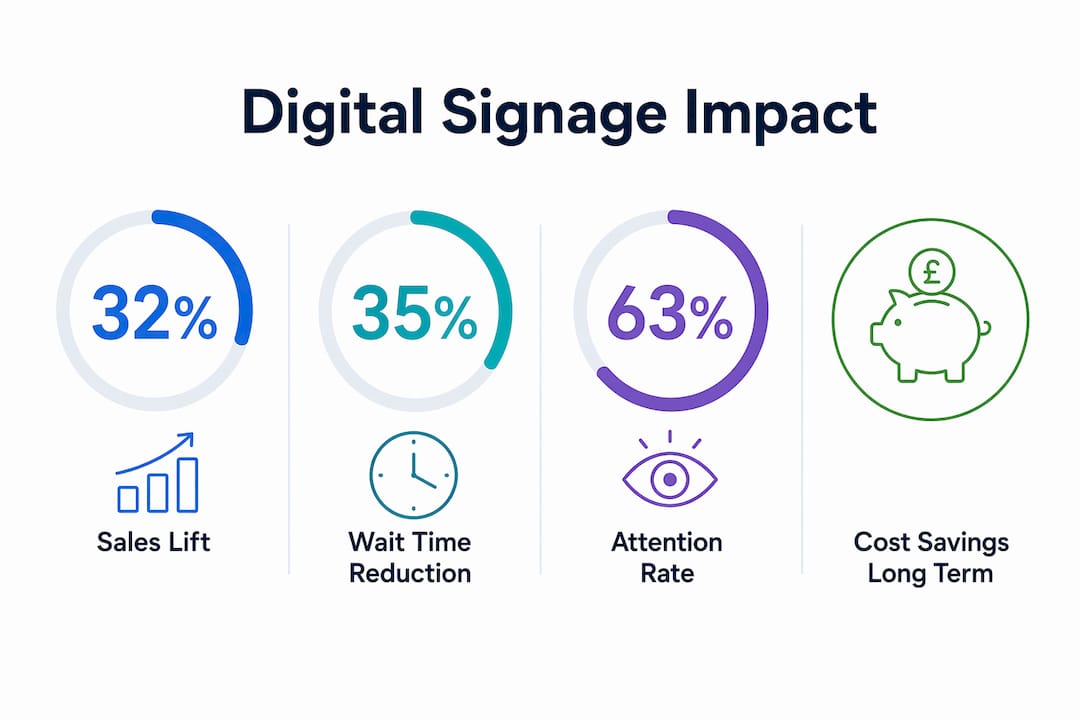
The sales impact of digital signage in retail is well documented. Promoted products see up to a 32% sales lift when displayed on digital screens versus static shelf cards or printed posters. That figure matters because it applies to individual promoted lines, meaning a well-planned content schedule across multiple product categories compounds the effect across your entire floor.
Customer experience improves alongside sales. Digital signage reduces perceived wait times by up to 35% in hospitality and healthcare environments. Customers who are engaged by a screen feel less frustrated during queues, which directly affects satisfaction scores and repeat visits.
Attention and recall rates tell an equally clear story. Digital displays achieve an attention capture rate of approximately 63%, compared to 15% for static signage. Message recall sits at around 83% for digital versus 52% for static. That gap means your promotions, menu changes, and operational notices are far more likely to register with customers.
| Metric | Static signage | Digital signage |
|---|---|---|
| Attention capture rate | ~15% | ~63% |
| Message recall rate | ~52% | ~83% |
| Sales lift for promoted products | Minimal | Up to 32% |
| Perceived wait time reduction | None | Up to 35% |
| Content update speed | Days to weeks | Minutes |
Cost savings add up over time as well. Eliminating recurring print production, distribution logistics, and installation labour removes a significant ongoing expense. Businesses that previously updated printed menus or promotional posters monthly find that digital content updates cost almost nothing once the infrastructure is in place.
Pro Tip: Track the sales performance of digitally promoted products separately from your baseline. This gives you concrete ROI data to justify further investment and refine your content schedule.
How do the four key components shape system effectiveness?
Successful digital signage depends on the integration of four components: commercial-grade hardware, a CMS, a content strategy, and reliable network connectivity. Weakness in any one of these reduces the effectiveness of the whole system.
Commercial-grade hardware versus consumer TVs
Consumer televisions are not built for continuous commercial use. Commercial displays are designed for 16–24 hour operation, with higher brightness ratings, better cooling systems, and burn-in protection. Consumer TVs used in commercial settings fail prematurely, produce washed-out images in bright retail environments, and void manufacturer warranties. The cost saving at purchase is quickly erased by replacement costs and downtime.
The role of the content management system
A CMS is the software layer that controls what plays on each screen, when it plays, and for how long. CMS platforms with automated scheduling and proof-of-play auditing reduce the operational burden significantly. Proof-of-play logs confirm that specific content ran at specific times, which matters for promotional compliance and franchise accountability. Without this, managing more than a handful of screens manually becomes unsustainable.
Network connectivity and content caching
Network reliability determines whether your screens display the right content at the right time. Most modern CMS platforms cache content locally on the display or media player, so a temporary internet outage does not cause screens to go blank. Wired connections are preferable in fixed installations. Wi-Fi works for smaller deployments but introduces more points of failure.
Pro Tip: When evaluating a CMS, ask specifically about proof-of-play reporting and offline caching. These two features separate professional-grade platforms from basic display tools.
Why does content strategy determine digital signage success?
About 80% of unsuccessful digital signage deployments fail because of poor content planning, not technology failure. The screens work. The content does not. This is the most overlooked risk in any digital signage investment.
Dynamic, contextual messaging influences real-time customer decisions in ways that static content cannot. A coffee shop displaying a hot drink promotion during a cold morning commute, or a restaurant showing a lunch special at 11:30 AM, is using context to drive immediate action. That is fundamentally different from a poster that shows the same message all day regardless of conditions.
Effective content types for retail and hospitality include:
- Promotional offers tied to time of day, season, or stock levels
- Menu boards with live pricing and item availability
- Wayfinding in larger venues, reducing staff interruptions
- Queue management messaging to reduce perceived wait times
- Brand content such as product origin stories or customer reviews
Multi-site operators need both central control and local flexibility. Centralised CMS with local override allows head office to push brand-consistent messaging while individual locations adapt promotions to local demand. Without that flexibility, local managers either ignore the system or work around it.
Best practices for content planning:
- Define your content zones before installation. Decide which screens carry promotions, which carry operational information, and which carry brand content.
- Build a content calendar with at least four weeks of scheduled material before going live.
- Set a review cycle. Content that is not refreshed within two to four weeks starts to lose effectiveness.
- Use dayparting. Schedule different content for morning, afternoon, and evening audiences.
- Measure and adjust. Track which content correlates with sales spikes and replicate those formats.
Pro Tip: Treat your digital signage content like a social media feed, not a printed poster. It needs regular updates to stay relevant. Assign a named person in your team to own the content calendar.
How do you implement and maintain digital signage for lasting impact?
The initial cost of a digital signage installation runs at approximately £430–£450 per screen in the first year, with a typical return on investment achieved within six months through increased revenue and reduced print costs. That timeline assumes the system is properly installed, the CMS is configured correctly, and content is updated regularly.
Professional installation and planning reduce costly reconfigurations and extend system life. Screens mounted at the wrong height, cabled poorly, or connected to underpowered media players create ongoing problems that erode the initial investment. Getting this right at the start is cheaper than fixing it later.
Operational considerations worth addressing before deployment:
- Managed service versus in-house management. Managed services handle CMS updates, monitoring, and fault response. In-house management gives more control but requires trained staff.
- Content automation. CMS platforms that integrate with your POS or stock management system can update pricing and availability automatically, removing manual steps.
- Screen placement audit. Map customer dwell points before deciding where screens go. High-dwell areas such as queues, reception desks, and entrance lobbies deliver the best return.
- Maintenance schedule. Commercial displays need periodic cleaning, firmware updates, and cable checks. Build this into your operational calendar.
The role of digital signage in retail extends beyond promotion. It handles operational communication, staff notices, safety messaging, and brand storytelling simultaneously. Businesses that treat it as a single-purpose promotional tool underuse it significantly.
Pro Tip: If you are managing more than five screens, a managed CMS service almost always pays for itself in staff time saved. Calculate the hourly cost of manual content updates across your team before deciding.
For practical examples of how businesses are using screens to drive engagement, the customer engagement examples from Ycr show real-world applications across retail and hospitality formats.
Key takeaways
Digital signage delivers measurable commercial results when hardware, CMS, content strategy, and network connectivity work together as a single system.
| Point | Details |
|---|---|
| Attention and recall advantage | Digital displays capture 63% attention versus 15% for static, with 83% message recall. |
| Sales impact is proven | Retailers report up to 32% sales increases for products promoted on digital screens. |
| Content strategy is the critical factor | 80% of failed deployments trace back to poor content planning, not hardware failure. |
| Commercial hardware is non-negotiable | Consumer TVs fail under continuous commercial use; commercial-grade displays are built for 16–24 hour operation. |
| ROI arrives quickly | Typical payback on a digital signage installation is within six months of deployment. |
Digital signage as the last mile of customer communication
I have worked with retail and hospitality operators long enough to see a consistent pattern. Businesses invest in good stock, good staff, and good locations, then communicate with customers using a printed A4 sheet taped to the door. That gap between operational investment and customer communication is where digital signage does its best work.
What I find most telling is that the businesses seeing the strongest results are not necessarily the ones with the largest screens or the most complex setups. They are the ones that treat their screens as a live communication channel rather than a digital poster. They update content weekly. They use dayparting. They connect their CMS to their POS so pricing stays accurate automatically. The technology is almost secondary to the discipline.
The growing integration of AI-driven content scheduling is worth watching. Systems that automatically surface the highest-performing content based on time, weather, and footfall data are already available. For multi-site operators, that kind of automation removes the content governance burden that causes most deployments to stagnate after the first few months.
My honest view is that digital signage is not a marketing tool. It is communication infrastructure. Businesses that plan it as such, with the same rigour they apply to their POS systems or their Wi-Fi networks, get returns that justify the investment many times over. Those that treat it as a display upgrade rarely do.
— John
Ycr’s outdoor digital signage for retail and hospitality
Ycr supplies freestanding outdoor digital posters purpose-built for retail and hospitality environments where visibility and weather resistance are non-negotiable.
The 75" outdoor digital poster delivers maximum impact at entrances, forecourts, and high-footfall outdoor locations. For venues with tighter space requirements, the 49" freestanding poster offers the same commercial-grade brightness in a more compact format. Smaller venues such as cafés, takeaways, and boutique retail units benefit from the 43" outdoor poster, which combines strong visibility with a footprint that works in constrained spaces. All three are built for continuous commercial operation. Contact Ycr directly for specification advice and pricing tailored to your site.
FAQ
What is digital signage and how does it work?
Digital signage is a network of commercial displays controlled by a content management system that schedules and delivers dynamic content to specific screens. The system combines hardware, software, and network connectivity to update messaging remotely in real time.
How much does digital signage cost for a small business?
Setup costs run at approximately £430–£450 per screen in the first year, with most installations paying back within six months through increased sales and reduced print costs.
Why does digital signage outperform static signs?
Digital displays capture 63% of viewer attention compared to 15% for static signage, and achieve message recall rates of 83% versus 52%. Dynamic content that changes with context is simply more engaging than a fixed image.
What causes most digital signage deployments to fail?
Poor content planning causes approximately 80% of unsuccessful deployments. The hardware and software typically function correctly. The failure point is a lack of scheduled, relevant content that engages customers at the right moment.
Do I need commercial-grade screens or can I use a consumer TV?
Commercial-grade screens are required for any continuous retail or hospitality use. Consumer TVs are not rated for 16–24 hour operation and fail prematurely in commercial environments, producing poor brightness and risking burn-in.