

A well-designed workflow for hospitality operations is a documented, repeatable sequence of tasks that connects your front desk, housekeeping, kitchen, and procurement teams into one coherent system. Labour costs account for 30–40% of a hotel’s operational expenses. That single figure explains why process discipline is not optional. When your workflows are clear, consistent, and supported by the right technology, service quality rises and cost overruns shrink. This guide covers which workflows to prioritise, which tools to deploy, how to build effective standard operating procedures (SOPs), and how to measure whether your efforts are working.
What core workflows should hospitality operators prioritise?
The most impactful workflows are those your team executes dozens of times every day. Five to seven core SOPs cover 80% of daily guest touchpoints and staff training needs. That means you can achieve the majority of your operational gains by getting a small number of processes right before expanding further.
The seven workflows that deliver the greatest return are:
- Check-in and check-out — the first and last guest impression, directly tied to satisfaction scores
- Housekeeping room turnover — productivity benchmarks at 2–3 rooms per staff hour
- Guest complaint handling — requires clear escalation paths and resolution time targets
- Kitchen order management — covers ticket flow, prep sequencing, and allergen checks
- Procurement and stock control — prevents over-ordering and supplier payment delays
- Maintenance coordination — links fault reporting to resolution without disrupting occupied rooms
- Staff scheduling and approval — controls labour spend before shifts begin, not after
| Workflow | Guest Impact | Operational Complexity |
|---|---|---|
| Check-in / check-out | Very high | Low to medium |
| Housekeeping turnover | High | Medium |
| Guest complaint handling | Very high | Medium |
| Kitchen order management | High | High |
| Procurement and stock | Low (indirect) | High |
| Maintenance coordination | Medium | Medium |
| Staff scheduling | Medium | Low to medium |
Pro Tip: Start your SOP rollout with check-in and housekeeping. These two workflows touch every guest on every stay and give you the fastest visible return on your investment in process design.
Which tools best support effective hospitality workflows?
The right technology turns a paper SOP into a live, trackable system. Workflow automation platforms deliver full operational visibility and automated task routing within approximately four weeks of deployment. That is a short enough window to justify the investment even for independent operators.

The core technology stack for hospitality process management breaks down into three layers.
Digital check-in and guest-facing systems. Digital check-in kiosks reduce check-in times from 4–5 minutes to approximately 90 seconds. ProStay’s digital systems are a practical example of this category. Faster check-in frees front desk staff for higher-value interactions and reduces queue frustration during peak arrival windows.
SOP management platforms. Chekin’s SOP card system presents procedures as skimmable action cards with if/then exception logic and quality checks built in. This format is far more usable under pressure than a dense policy document. Staff can reference a Chekin SOP card mid-task without losing their place.
Hospitality ERP software. ERP solutions must unify operational teams to reduce inefficiencies and deliver consistent guest experiences. SysGenPro’s hospitality ERP acts as an interconnected operating system, combining procurement, inventory, housekeeping, and front desk data in one place. You can also learn how integrated POS systems create the same kind of operational visibility at the point of sale.
| Technology Layer | Primary Benefit | Example |
|---|---|---|
| Digital check-in | Cuts check-in to 90 seconds | ProStay kiosk systems |
| SOP card platforms | Reduces training time and errors | Chekin SOP cards |
| Hospitality ERP | Unifies all operational data | SysGenPro ERP |
| POS software | Connects orders, payments, and reporting | SAMTOUCH, EZEEPOS |
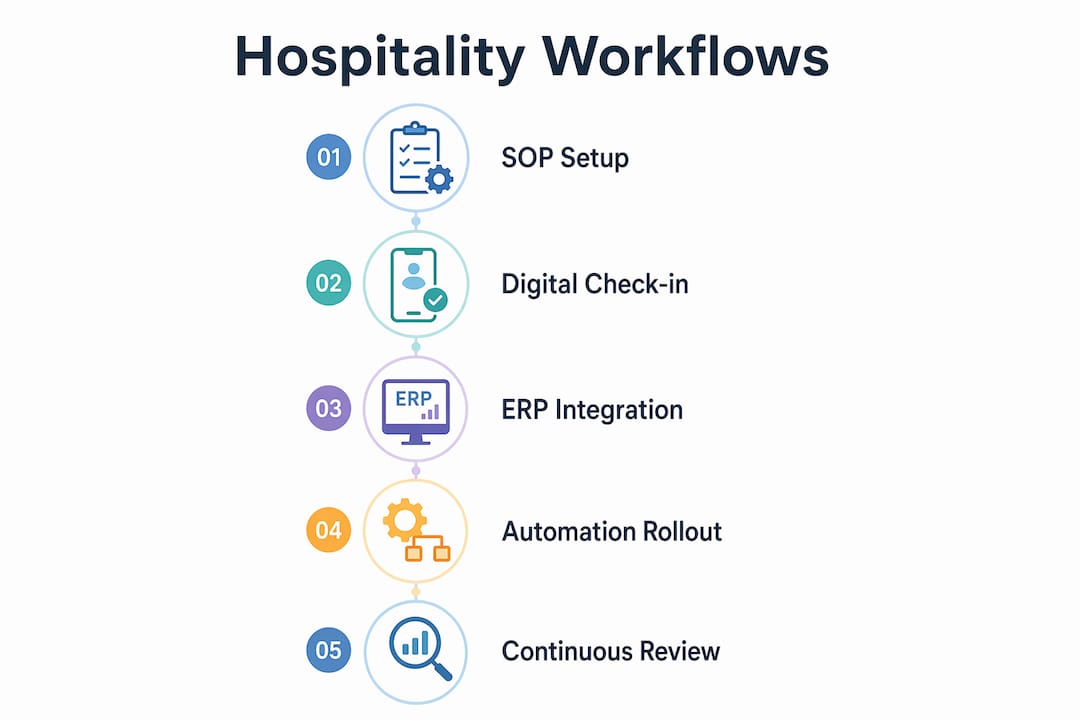
Pro Tip: Do not deploy all three layers simultaneously. Start with your SOP platform, then add digital check-in, then integrate your ERP. Phased adoption prevents staff overload and gives each tool time to bed in.
How do you build and implement hospitality workflows step by step?
Designing a workflow is not the same as writing a policy document. A usable SOP is a tested, living document that a new team member can follow without asking for help. Well-designed SOPs combined with digital flows reduce manual steps and errors across the operation.
Follow this sequence for each core workflow:
- Map the current process. Walk through the task yourself and note every decision point, exception, and handoff. Include edge cases such as late arrivals, no-shows, and double bookings.
- Draft the SOP card. Structure it with a clear purpose, defined scope, named owner role, numbered steps, exception handling, and a quality check at the end.
- Test with a new hire. Hand the SOP to your least experienced team member and ask them to complete the task without assistance. Where they hesitate or ask questions, your SOP has a gap.
- Revise and publish. Simplify any step that caused confusion. Publish the final version in your SOP platform so it is accessible on the floor, not filed in a folder.
- Integrate automation. Connect task completion triggers to your workflow platform so that, for example, a checked-out room automatically generates a housekeeping task.
- Run a 30-day review. Collect staff feedback and check whether exception rates are falling. Adjust the SOP where real-world use reveals new edge cases.
- Schedule quarterly reviews. Operational conditions change. A quarterly review cycle keeps your SOPs current and prevents drift back to informal practices.
A phased rollout of 30–90 days for your core workflows gives each SOP time to become habitual before you add the next. Rushing the rollout is the single most common reason operators abandon their process improvement efforts. Staff hours approval processes are a good early candidate for automation because the rules are clear and the savings are immediate.
What are the common pitfalls in hospitality workflow management?
Most workflow failures are not technology failures. They are design failures that technology then amplifies.
Tribal knowledge. When your best supervisor carries the process in their head, you have a single point of failure. Testing SOP usability with new staff reveals hidden complexity and the need for simplification. If a task cannot be documented clearly enough for a new hire to follow, it is not yet a workflow. It is still an informal habit.
Overly complex approval chains. Complex approval workflows cause staff to bypass controls, which harms cost discipline and data integrity. The solution is threshold-based automated approvals. Purchases below a set value are auto-approved; larger orders trigger a manager review. This keeps the operation moving without removing financial oversight.
Disconnected systems. When your front desk, housekeeping, and maintenance teams use separate tools that do not communicate, delays accumulate and guests notice. A room marked clean in housekeeping but not updated in the front desk system creates unnecessary wait times at check-in.
Pro Tip: Before buying any new software, audit your existing tools for integration capability. A system that cannot share data with your POS or property management platform will create a new silo, not solve an old one.
Avoid overengineering your workflows in the early stages. A five-step SOP that staff actually follow is worth more than a fifteen-step process that nobody reads. Simplicity is not a compromise. It is a design principle.
How should you measure workflow success and optimise operations?
Revenue alone does not tell you whether your operations are healthy. CPOR and labour efficiency are often more indicative of operational health than top-line revenue metrics like RevPAR. Cost per occupied room (CPOR) tracks what it actually costs you to service each guest, and that number responds directly to workflow improvements.
The metrics that matter most for hospitality process management are:
| KPI | Measurement Interval | Improvement Target |
|---|---|---|
| Labour cost as % of revenue | Weekly | Below 35% |
| Cost per occupied room (CPOR) | Monthly | Downward trend quarter on quarter |
| Housekeeping rooms per staff hour | Daily | 2–3 rooms per hour |
| Check-in completion time | Daily | Under 90 seconds |
| Guest satisfaction score | Weekly | Above property benchmark |
| Maintenance resolution time | Weekly | Under 4 hours for non-urgent faults |
Daily operational reviews catch problems before they compound. Weekly reviews identify trends. Monthly reviews inform staffing and procurement decisions. Quarterly reviews trigger SOP updates. Each review cycle serves a different purpose, and skipping any one of them creates blind spots.
AI-driven hotel operations enable centralisation and faster decision-making, which means your tracking dashboards can now surface anomalies in real time rather than in the next morning’s report. For operators managing multiple sites, this shift from reactive to proactive management is where the largest efficiency gains now sit. You can also explore how setting up a POS workflow connects payment and order data directly into your performance reporting.
Key takeaways
Effective hospitality operations require documented SOPs, integrated technology, and consistent KPI tracking to deliver reliable service and controlled costs.
| Point | Details |
|---|---|
| Prioritise seven core workflows | Check-in, housekeeping, complaints, kitchen, procurement, maintenance, and scheduling cover the majority of daily operations. |
| Deploy technology in phases | Start with SOP platforms, then digital check-in, then ERP integration to avoid staff overload. |
| Test every SOP with new staff | If a new hire cannot follow it unaided, the SOP needs simplification before rollout. |
| Use CPOR alongside revenue metrics | Cost per occupied room reveals operational health that RevPAR alone cannot show. |
| Review workflows quarterly | Operational conditions change; quarterly SOP reviews prevent drift back to informal practices. |
Where workflow theory meets the reality of running a venue
I have seen operators invest heavily in workflow documentation and then wonder why nothing changed. The documents were thorough. The training sessions were well attended. But six weeks later, staff were back to doing things their own way. The problem was not the content of the SOPs. It was that nobody had tested them under real conditions before launch.
The most reliable thing I have found is this: hand your freshest team member the SOP on a busy Friday evening and watch what happens. Not in a training room. On the floor. That test will tell you more about your workflow design than any internal review meeting ever will.
There is also a tendency in hospitality to treat automation as a cost-cutting exercise. That framing leads to bad decisions. The operators who get the most from their workflow investments treat automation as a way to free up their best people for the work that actually requires human judgement. A kiosk handles check-in. Your front desk team handles the guest who has had a difficult journey and needs someone to actually listen.
The other thing worth saying plainly: do not buy a system because it has the most features. Buy the one your team will actually use. A modular platform that your staff adopt fully will outperform a feature-rich system that gets bypassed within a month. Scalability matters, but only if the foundation is solid.
— John
Upgrade your hospitality operations with Ycr
Ycr supplies the POS hardware and software that sit at the centre of a well-run hospitality operation. Whether you are building a new workflow from scratch or replacing a system that has outgrown your venue, the right point of sale technology makes the difference between a process that works on paper and one that works on the floor.

The SAMTOUCH POS software with hardware gives you an integrated order and payment workflow built specifically for hospitality. If you already have hardware in place, SAMTOUCH without hardware slots into your existing setup. For venues that need broader operational control, Touchpoint Software extends your visibility across service, stock, and reporting. Browse the full range at Ycr to find the right fit for your operation.
FAQ
What is a workflow in hospitality operations?
A hospitality workflow is a documented sequence of tasks that defines who does what, in what order, and to what standard across operational areas such as check-in, housekeeping, and kitchen management. It replaces informal habits with repeatable, trainable processes.
How long does it take to implement a new hospitality SOP?
A phased rollout of 30 days per core SOP is the recommended approach, with a full set of five to seven SOPs typically completed within 90 days. Rushing the process increases the risk of staff reverting to previous habits.
What is CPOR and why does it matter for workflow management?
CPOR stands for cost per occupied room and measures the total operational cost of servicing each guest stay. It is a more direct indicator of workflow efficiency than revenue metrics because it rises when processes are wasteful and falls when they improve.
Which workflows should a hotel automate first?
Check-in and staff scheduling approval are the strongest candidates for early automation because the rules are clear, the volume is high, and the time savings are immediate and measurable.
How do you prevent staff from bypassing approval workflows?
Threshold-based automated approvals are the most effective solution. Low-value decisions are approved automatically, while larger decisions trigger a manager review. This removes friction from routine tasks without removing financial oversight.